


A plain-language guide for teams that are new to AI agents.
Every team has a version of this story. A new analyst joins, and within their first week, a senior colleague spends two hours walking them through the weekly pipeline report – which data to pull, how to format it, what leadership wants to see. The analyst takes notes. Two months later, someone else joins and the whole conversation happens again.
This is the hidden tax on knowledge work. Not the big creative challenges – those are worth the time. It’s the repeatable, learnable, should-already-be-solved tasks that drain the hours. Status reports. Research summaries. Document formatting. Review checklists. AI agents can handle all of these. But getting one to do something reliably – the same way, every time – is where agent skills come in.
So What exactly is an agent skill?
Think of a skill as a set of written instructions you give to an AI agent, packaged in a way it can reuse across many tasks.
Imagine you hired a very capable contractor. On their first day, you explain how things work – your preferred report format, your email tone, your pre-release checklist. If you wrote all that down and handed it over, that document is essentially a skill.
“Agent Skills are modular capabilities that extend an AI’s functionality. Each Skill packages instructions, metadata, and optional resources – scripts, templates – that the agent uses automatically when relevant.” – Anthropic – Agent Skills Overview
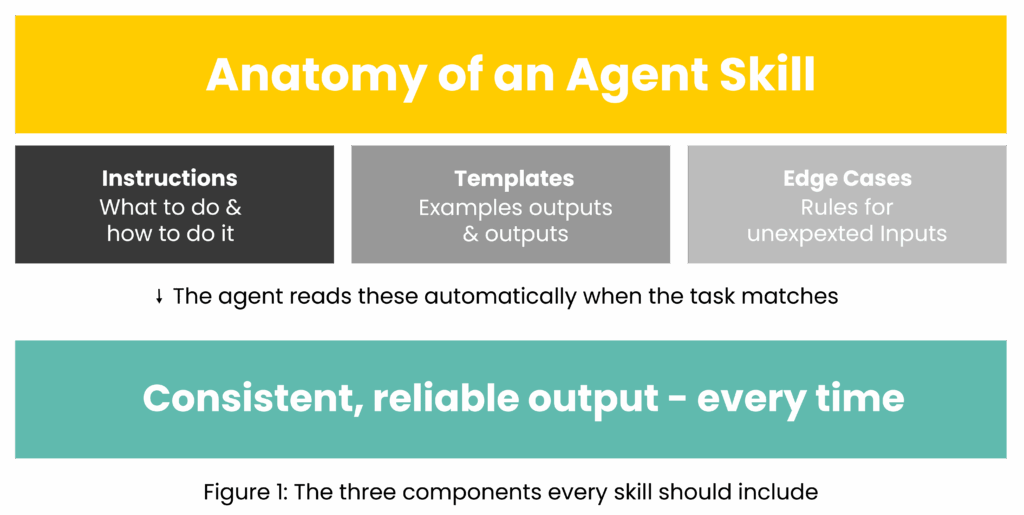
In practice, a skill is a file (or a small folder of files) that contains:
- Instructions – what to do and how to do it.
- Templates or examples – so the output looks right every time.
- Rules for edge cases – what to do when something unexpected happens.
When the agent encounters a matching task, it reads the skill and follows the guidance – without you needing to re-explain anything.
How is this different from just giving an AI instructions?
It’s a fair question. You can already type instructions into an AI chat window – so why bother with skills?
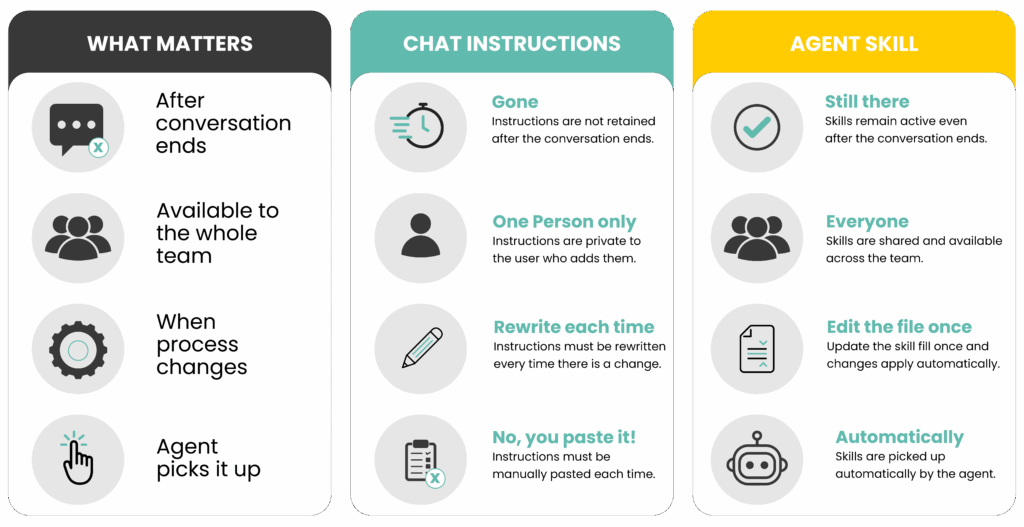
The difference is persistence and reuse. When you type instructions into a chat, they disappear the moment that conversation ends. Next time, you start from scratch. A skill lives in a file. It doesn’t disappear. Anyone on your team can use it, it can be updated when your process changes, and the agent picks it up automatically – no copy-pasting required.
“Unlike prompts (conversation-level instructions for one-off tasks), Skills load on-demand and eliminate the need to repeatedly provide the same guidance across multiple conversations.” – Why use skills
Here is a simple way to see the difference:
Where does repetition live?
Before building any skill, it helps to look at where your time goes. Most teams will recognize at least one of these:
- Reports and updates – weekly status reports, meeting summaries, or project updates that follow the same structure but need fresh information each time.
- Document work – reformatting spreadsheets, extracting key points from long PDFs, filling in templates with new data.
- Research and comparisons – pulling information from multiple sources and presenting it in a consistent way, such as comparing vendors or summarizing news.
- Drafting communications – emails and notifications that follow a known structure but change in the details, like incident reports or client updates.
- Review checklists – running through a fixed set of criteria before a document goes out, a deployment happens, or a contract gets signed.
If you recognize any of these, you have a candidate for a skill.
The compounding return
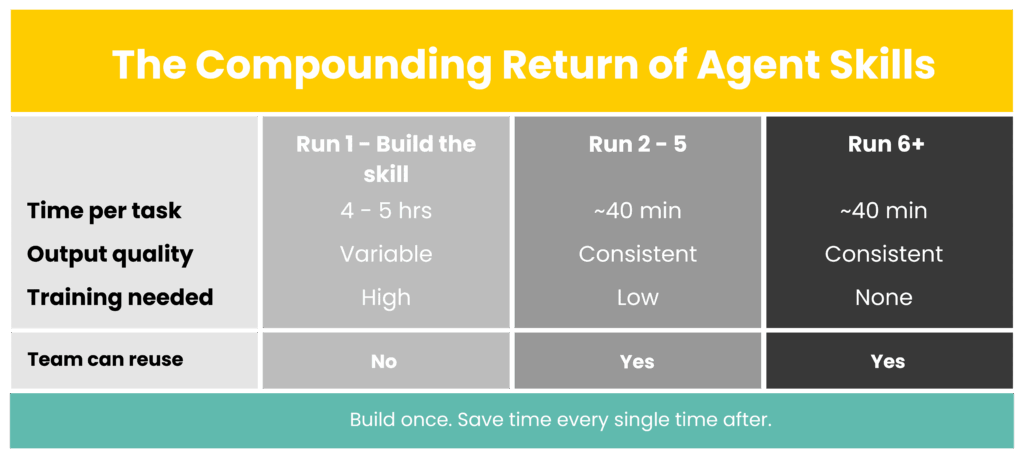
Here is the key insight: The first time you build a skill, it costs you a little extra time. Every time after that, it saves you time.
Say your team produces a competitive analysis report every month. Currently, someone spends four hours on it: finding sources, writing up findings, formatting the executive summary. You invest an extra hour writing a skill that captures those rules.
From that point on, the agent follows the skill. The four hours becomes forty minutes. The output looks the same every month. And when someone new joins, they don’t need to be trained on the format – the skill already knows it.
“Skills are reusable resources that provide an agent with domain-specific expertise – workflows, context, and best practices that transform general-purpose agents into specialists.” – Anthropic – Why use skills
Three quick examples
The concept is clearest when you see it applied. Here are three real-world scenarios:
Weekly project status report
- Before: A project manager spends 45 minutes every Friday pulling updates, formatting a color-coded table, writing a risk summary, and sending it to stakeholders.
- After: With a skill, the agent knows the format, color-coding criteria, and sign-off language. The manager reviews and sends. Time: 10 minutes.
Vendor contract review
- Before: A team member reads every new vendor contract looking for unusual payment terms or liability clauses – 2 to 3 hours per contract.
- After: With a skill, the agent knows what standard terms look like and what to flag. It produces a short summary with deviations highlighted. Review time drops to 30 minutes.
Pre-deployment checklist
- Before: An engineer runs through a mental checklist before every production release. Under pressure, steps get missed.
- After: With a skill, the agent runs the checklist automatically, surfaces any failures before they cause problems, and logs the result. The engineer focuses on decisions, not process.
What makes a skill actually work?
A skill that is vague will produce vague results. A few things make the difference:
“Skills work with 18+ AI agents – including Claude Code, GitHub Copilot, Cursor, Cline and many others.” – Installing Skills
- Be specific about when to use it – “Use this skill for weekly pipeline reports” is better than “use this for reports.” Unclear triggers lead to the wrong skill being applied at the wrong time.
- Show the expected output, don’t just describe it – Include a template or example. An agent that can see what ‘done’ looks like produces far more consistent results than one that is only told what to include.
- Handle the exceptions – What happens when data is missing? When a column is empty? Skills that only handle the ideal scenario break down quickly in real life.
- Treat it like a document you maintain – When your process changes, update the skill. When output drifts from what you want, improve the instructions. The skill gets better the more you use and refine it.
“Copilot Studio lets you extend your agent using skills. If you already have bots deployed in your organization (built by using pro-code tools, including the Microsoft 365 Agents SDK) for specific scenarios, you can convert such a bot to a skill and embed the skill within a Copilot Studio agent.” – Use Skills in Copilot Studio
The real shift
Skills don’t just save time. They change what you spend your time on.
When the repeatable work runs itself, you move from doing to designing. Instead of producing the weekly report, you design the skill that produces it. Instead of running the review checklist, you maintain the criteria that make it useful.
This is the more durable value. The knowledge of how your team does things – your formats, your standards, your decision rules – stops living in one person’s head and starts living somewhere it can be shared, improved, and used again and again.
You don’t need to automate everything at once. Start with one task that repeats every week, takes longer than it should, and follows rules you could write down. Write the skill. Run it. Iterate.
That one task is your proof of concept. Everything else follows from there.
